 AISP
AI cartoon generator from text: make a cartoon story that keeps its characters
Describe the story in text, choose the Cartoon style, and let the AI write the episode, design each character once and draw every scene from those designs. In AISP you can render it as a narrated cartoon (Motion) or as moving video with dialogue and sound.
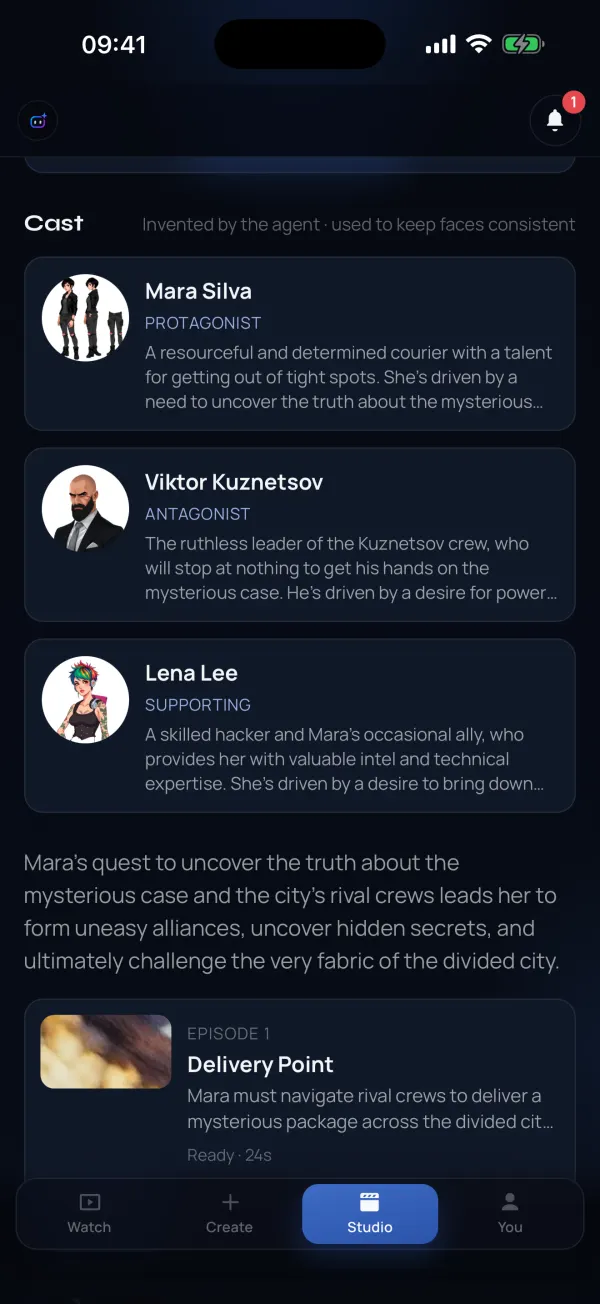
From a sentence to a cartoon
Text-to-cartoon tools range from single-image generators (one cartoon picture per prompt) to video generators (one short clip per prompt). Neither makes a cartoon story on its own, because a story needs the same characters across many shots.
AISP starts with the text: you describe a person, a place and a problem, and the agent writes a series bible and the first episode’s script. Each character gets a written design and a cartoon portrait, and every scene is drawn from those, in the Cartoon style that is locked for the series.
Choosing how it moves
- Storyboard: one cartoon frame per scene with the text on screen, 1 credit per second.
- Motion: cartoon scenes with a narrator voice and camera moves, 2 credits per second.
- Video: moving cartoon footage with generated dialogue and sound, from 11 credits per second (Draft).
Many people make the whole first episode in Storyboard, fix the story, then render later episodes in Motion or Video.
Writing text that cartoons well
- Give characters a silhouette: a big coat, a tiny dog, a bright scarf. Distinct shapes read clearly in cartoon form.
- Write action, not description: “she trips over the cat and drops the cake” draws better than “she feels clumsy”.
- Keep the cast small. Three or four characters are easier to keep consistent and funnier to bounce off each other.
- Use a running gag; it gives episodes a shape.
A worked example
Text: “Two flatmates, one human and one ghost, argue about who pays the electricity bill.” From that, the agent writes a series bible: the human flatmate, the ghost (with a fixed look, say a Victorian nightgown and a candle that never goes out), the landlord, the rules of the haunting and a season outline where each episode is a different household argument.
Episode 1 might be six scenes: the bill arrives, the ghost claims ghosts do not use electricity, the human catches her watching TV at 3 a.m., and so on. Every scene is drawn in the Cartoon style from the same character portraits, so the ghost looks the same in scene 1 and scene 6.
What text-to-cartoon AI cannot do yet
- Frame-by-frame animation control: you describe the scene, the model animates it.
- Using your own drawings or photos as the characters.
- Exporting the finished cartoon as a video file from AISP; episodes play and share by link.
Questions
Can I turn a photo into a cartoon character?
No. AISP designs characters from text descriptions; attached images are not used as character references.
Is it free?
Writing the story bible is free. New accounts get 100 free credits, enough for a first Storyboard episode; after that, credits are one-time purchases.
Product details checked November 2026. Rates and features can change; the app always shows the current cost before you confirm.