 AISP
How to make an AI Christmas story for kids
Start with your child’s own idea in one sentence: who the story is about, where it happens and the small problem to solve before Christmas morning. In AISP a grown-up types that in, the agent writes a short series with a fixed cast, and you read every script before anything is drawn. Writing is free; pictures and rendered episodes use credits, and the cost is shown before you confirm.
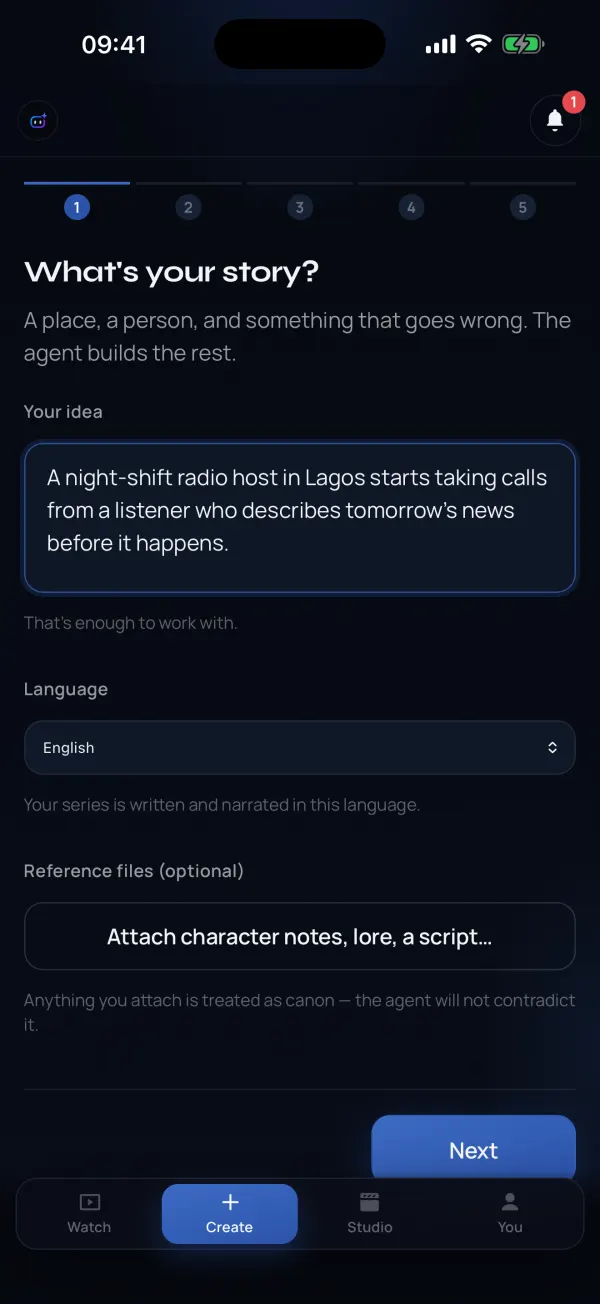
Step by step
- Ask your child three questions: who is the story about, where are they, and what goes wrong before Christmas?
- Write the answers as one or two sentences, and add the ending you want, such as “everyone is home by bedtime”.
- A grown-up signs in at tryaisp.com or in the Android app and opens Create.
- Type the idea, choose a language, pick the Animation genre and the Cartoon or 3D Animation style, and keep it short: three episodes of a few scenes each.
- Create the series and read the series bible together: the title, the characters and the episode list.
- Script episode 1 with the Standard writer, which is free, and read it yourself before rendering anything.
- Check the cost on the confirm screen, then render the episode as a Storyboard or with Motion narration.
- Watch it yourself once, then watch it together.
What makes a Christmas story work for young children
- One small problem. A lost mitten, a light that will not switch on or a guest who is late is enough.
- A character who wants something a child understands: to stay up, to help, to be brave or to get home.
- Three beats. Something goes wrong, a first try fails, and a second try works because somebody helps.
- Something that repeats. A phrase or a sound that comes back in each scene gives a child a line to join in with.
- A warm ending in a safe place. Bedtime stories finish with everyone indoors.
- Nothing frightening left hanging. If there is a storm or a dark wood, it is over before the last scene.
Children care more about their own idea than a polished one. If your child says the hero is a penguin who drives a bin lorry, keep the bin lorry.
A prompt you can copy
Fill in the gaps with your child’s answers and paste it into the Create screen:
“A gentle Christmas story for a five-year-old. [Name of the character], a [kind of animal or person], lives in [place]. On Christmas Eve, [the small problem]. With help from [a friend], they [how it is solved]. Three short episodes. Kind, funny and calm, with nothing scary, and everyone safe at home at the end.”
Say the age of the child and the tone you want. The agent writes to the brief it is given, so “gentle”, “nothing scary” and “ends at bedtime” are worth typing.
Which look to choose
- Storyboard: one illustrated frame for each scene with the script on screen. Good for reading aloud yourself. It is the cheapest look, at 1 credit per second of episode.
- Motion: the same illustrations with a narrator voice and camera movement, at 2 credits per second. Closest to a narrated picture book.
- Video: moving footage with generated dialogue and sound. It costs much more per second, so try a Storyboard episode first.
Every character gets a written appearance and a reference portrait, and each scene is drawn from those, so the hero looks the same in episode 3 as in episode 1.
What to check before your child watches
- Read the script first. Each episode is written as scenes you can read before you render it.
- Rewrite anything you do not like. You can write an episode yourself, up to 12,000 characters, and the agent splits it into scenes.
- Watch the finished episode once on your own. AI pictures can go wrong in small ways.
- AISP is not a children’s app. Its content policy is written for teenagers and adults, and the public catalogue includes genres such as horror and thriller, so watch your own series from its link and stay with younger children while they watch.
- Leave out surnames, schools and addresses. A first name or a nickname is plenty for a story.
What it costs
The series bible is free, and episode scripts are free with the Standard writer. Pictures and rendered episodes use credits: images cost 1 to 8 credits each, including the character portraits, and rendering costs 1 credit per second for Storyboard and 2 for Motion. Shorter episodes with fewer scenes cost less.
You do not have to guess. Each episode is scripted first, so the confirm screen shows its exact cost before anything is charged, and failed scenes are refunded. Do not plan on finishing an episode without credits: check the cost on that screen before you promise a film night.
What AISP does not do
- It does not download the episode as a video file. Episodes play in AISP on the web and on Android, and you share them by link.
- It does not put your child’s photo in the story. Attached images are not used as character references; the agent paints its own portraits from written descriptions.
- It does not make a printed picture book or a PDF.
- It does not let young children hold an account. Users must be at least 13, and under-18s need a parent or guardian’s permission, so a grown-up makes the story.
Questions
Can my child use AISP on their own?
Not if they are under 13. Accounts are for people aged 13 or over, and under-18s need permission from a parent or guardian. For a younger child, a grown-up makes the story and you watch it together.
Can I put my child in the story?
You can name a character after them in the text. AISP does not use photos as character references, so the character will not look like your child unless you describe their hair, clothes and so on in words. Leave out surnames and other personal details.
Is it free to make a Christmas story?
Writing is free: the series bible, and episode scripts with the Standard writer. Pictures and rendered episodes use credits. The confirm screen shows what an episode costs before you are charged.
How long is an episode?
An episode has 3 to 60 scenes, and Storyboard and Motion scenes run up to 15 seconds each. For a bedtime story, a handful of scenes is enough.
Can it tell the story in another language?
Yes. AISP writes and narrates in 15 languages, including Spanish, French, German, Portuguese, Arabic and Hindi. Choose the language when you create the series.
Product details checked November 2026. Rates and features can change; the app always shows the current cost before you confirm.