 AISP
AI story generator with pictures: how to make one that stays consistent
Type a one-line idea, let the AI write the story and describe each character’s look, generate one reference portrait per character, then illustrate every scene from those portraits in one locked style — so the pictures match the words and the faces match each other.
Step by step
- Write the idea in a sentence: a person, a place and something that goes wrong.
- Pick a language and a style (Cinematic, 3D Animation, Cartoon or Anime).
- Let the agent write the story bible: title, cast with fixed appearances, world and outline.
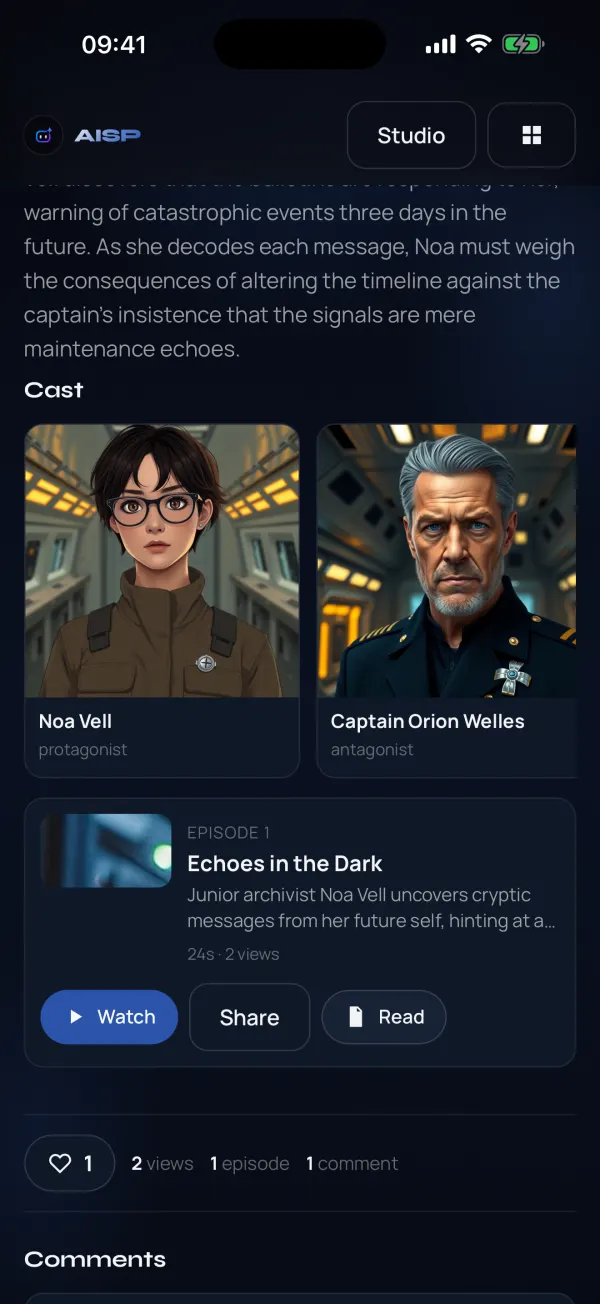
- Generate a portrait for each character so their face is fixed before any scene is drawn.
- Choose the Storyboard look for one illustrated picture per scene with the text on screen.
- Render episode 1, read it as a picture story, then continue with episode 2.
Why most AI picture stories fall apart
A typical AI story generator writes the text, then asks an image model to draw each paragraph separately. Each picture is a fresh guess, so the hero has brown hair on page one and blonde hair on page three, and the art style drifts from watercolour to 3D. The story reads fine; the pictures do not belong together.
The fix is to decide what must not change before drawing anything: a written appearance for each character (age, build, hair, clothing, one distinctive detail), a single art style, and a reference portrait that every later picture is seeded from.
How AISP does it
AISP is built for stories told in parts. From your idea the agent writes a series bible with a cast whose appearances are written as concrete descriptions, and it paints a portrait of each character. The style you choose is locked when the series is created, so it cannot drift between episodes.
Each episode is scripted into scenes before anything is drawn. In the Storyboard look, every scene becomes one illustrated frame with the script on screen — in effect, a picture book you can play. If you prefer a narrator, the Motion look adds a voiceover and camera movement over the same illustrations.
What it costs
- Writing the story bible: free.
- Episode scripts: free with the Standard writer; 10 credits with Sharp and 15 with Best (the default on the Create screen).
- Portraits and cover: 1 to 8 credits per image depending on the brush.
- Storyboard rendering: 1 credit per second of the finished episode. Scene frames seeded from portraits use the Detailed brush (5 credits each).
- New accounts get 100 free credits, enough for a first Storyboard episode.
Good uses
- Bedtime stories told over several nights, with the same characters each time.
- Read-along stories in another language — AISP writes and narrates in 15 languages.
- Testing a story idea before you spend on animation or video.
- Comic-style episodes for a series you plan to grow.
Writing ideas that illustrate well
- Name a place you can picture: a night market, a flooded station, a mountain monastery.
- Give the hero a visual anchor: a red scarf, round glasses, a battered courier bag.
- Write moments, not summaries: “the dragon lands on the library roof” draws better than “the dragon arrives”.
Questions
Can I upload my own character drawing?
You can attach files when you create a series, and text notes such as character descriptions and lore are treated as canon. Attached images are not used as visual references for the characters; the agent’s own portraits are.
Can I download the pictures as a book?
Not at the moment. Episodes play inside AISP and can be shared by link. The subtitle text can be downloaded from the player as a .vtt file.
Is it suitable for children’s stories?
Yes, gentle stories work well. AISP is for users 13 and over (under-18s need a parent or guardian’s permission), so younger children should make and watch them with an adult.
Product details checked November 2026. Rates and features can change; the app always shows the current cost before you confirm.