 AISP
AI character generator: design a cast that stays the same in every scene
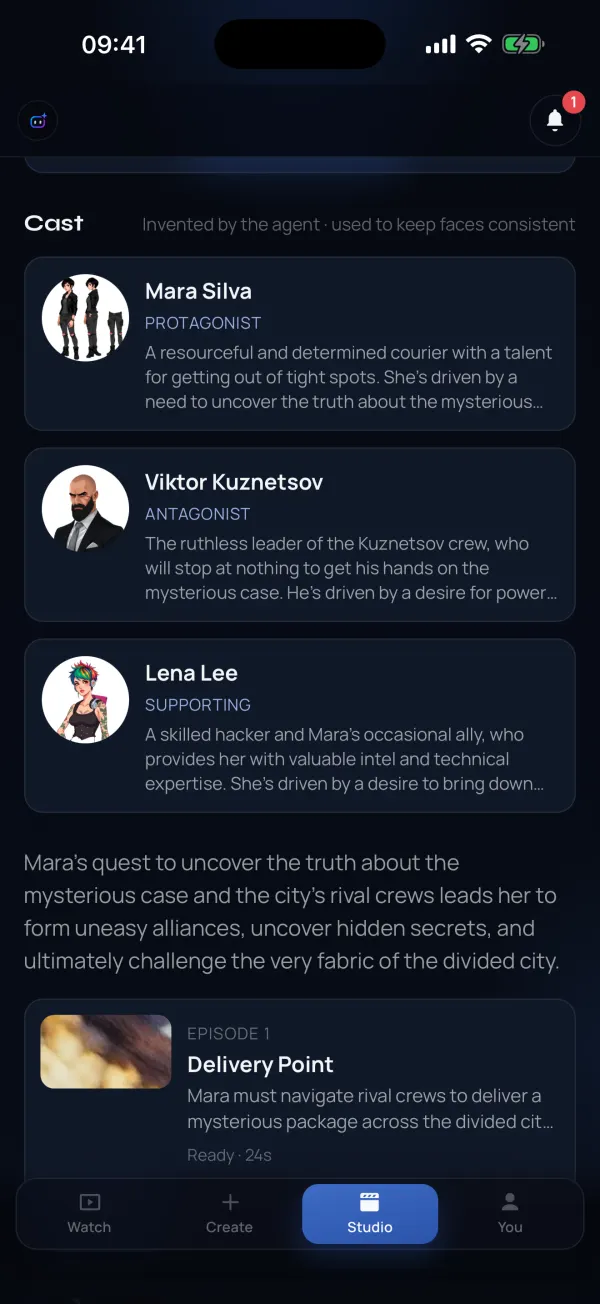
A useful AI character generator gives each character three things that do not change: a concrete written appearance (age, build, hair, clothing, one distinctive detail), a role and motive, and a reference portrait. Every later image or scene should be generated from those, not from a fresh prompt.
Why one-off character images are not enough
Image generators will happily draw “a young detective in a trench coat” — differently every time. That is fine for a single picture and useless for a story. As soon as the character needs to appear in a second scene, the face, age and outfit drift.
Consistency comes from fixing the character before drawing scenes: a description specific enough that two artists would draw the same person, and a portrait that later images are seeded from.
What AISP generates for each character
- A name and a role: protagonist, antagonist or supporting.
- A written appearance in concrete terms, reused in every scene prompt.
- A motive and personality, which the writer uses for dialogue and decisions.
- A reference portrait, painted in the series’ locked style and used to seed every scene frame.
New characters introduced in later episodes are added to the cast with their own portrait, so a recurring side character stays recognisable.
Writing a character description that holds
Be concrete and visual: “58, broad-shouldered, shaved head with a grey beard, black turtleneck, a scar through the left eyebrow” beats “an intimidating crime boss”. Pick one detail that is always there — a scarf, glasses, a tattoo — because a single anchor helps the model keep the identity.
You can attach your own character notes when you create a series; AISP treats attached text as canon and will not contradict it.
Costs
The cast is written for free as part of the series bible. Portraits are images, charged at the brush you choose: 1 credit (Fast), 5 (Detailed), 6 (Stylised) or 8 (Photoreal).
A quick character sheet to fill in
- Name and role (protagonist, antagonist, supporting).
- Age range and build.
- Hair, face and one distinctive feature.
- Signature clothing or object.
- What they want, what they fear, and how they talk.
Paste a sheet like this into the reference notes when you create an AISP series, and the agent will treat it as canon when it writes the cast.
Questions
Can I generate characters without making a full video?
Yes. Create the series and generate portraits; you only render episodes if and when you want to.
Which styles can characters be drawn in?
Cinematic (photoreal), 3D Animation, Cartoon or Anime. The style is locked for the whole series so the cast stays in one look.
Product details checked November 2026. Rates and features can change; the app always shows the current cost before you confirm.